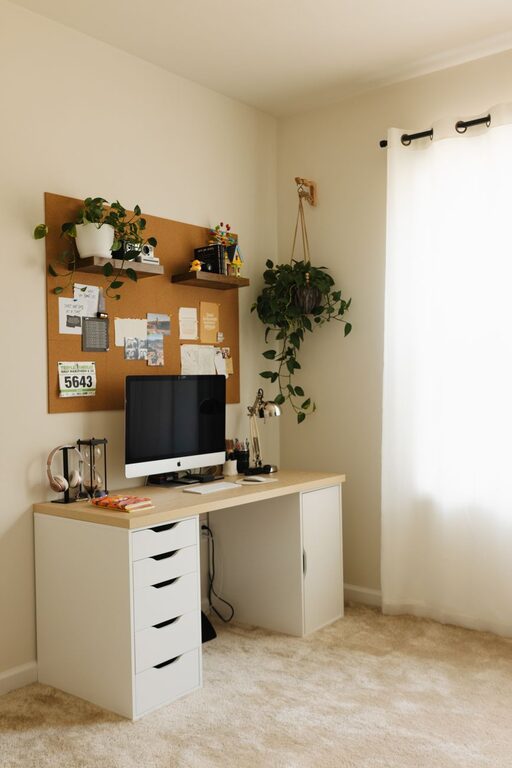




Creating a productive home workspace is essential for anyone working remotely or managing tasks from home. A well-designed space can improve focus, reduce distractions, and enhance your overall work performance. Whether you have a dedicated room or a small corner, these tips will help you set up an efficient and comfortable workspace.
Choose the Right Location
Selecting the perfect spot for your home workspace is the first step. Ideally, pick a quiet area with minimal foot traffic. If possible, choose a room with a door to separate your work from home life and help establish boundaries.
Consider natural light when selecting your workspace. Daylight can boost mood and energy levels, so place your desk near a window if feasible. Avoid direct glare on computer screens by positioning your desk at a 90-degree angle to the window.
Invest in Ergonomic Furniture
Comfort plays a key role in productivity and health during long work hours.
– Desk: Choose a desk that fits your space and provides enough surface area for your computer, notebooks, and other essentials.
– Chair: Invest in an ergonomic chair that supports your lower back and allows both your feet to rest flat on the floor.
– Monitor height: Position your monitor so that the top is at or just below eye level to reduce neck strain.
If you frequently stand or feel stiff sitting for long periods, consider an adjustable sit-stand desk.
Organize Your Workspace
A tidy workspace reduces distractions and helps you stay focused.
– Declutter your desk by keeping only necessary items within reach.
– Use organizers like trays, pen holders, or drawer dividers to keep supplies neat.
– Create a system for papers, such as filing folders or magazine holders.
– Manage cables with clips or sleeves to prevent tangles and mess.
Regularly spend a few minutes clearing and organizing to maintain a productive environment.
Minimize Distractions
Distractions can significantly reduce your efficiency. To create a focused atmosphere:
– Inform family members or housemates about your work hours and the need for quiet.
– Use noise-cancelling headphones or play background music to block out disruptive sounds.
– Turn off notifications on your phone and computer that are not work-related.
– Keep your workspace screen-free when not in use to prevent temptation.
Personalize Your Space
Adding personal touches can increase your comfort and motivation.
– Decorate with plants, which improve air quality and create a calming atmosphere.
– Display a few photos, artwork, or motivational quotes.
– Choose colors that inspire you; cooler tones, like blue or green, can be calming, while warmer tones may invigorate.
Keep personalization balanced so it doesn’t lead to clutter or distractions.
Set Up Proper Lighting
Good lighting reduces eye strain and keeps you alert.
– Maximize natural light during the day.
– Use a desk lamp with adjustable brightness and color temperature for tasks at night.
– Avoid harsh overhead lights that can cause glare or shadows.
Layering different light sources ensures your workspace stays well-lit at all times.
Establish Clear Boundaries
Working from home blurs the line between professional and personal time. To maintain productivity:
– Set specific work hours and communicate them to others.
– Create rituals signaling the start and end of your workday, such as closing your laptop or changing clothes.
– Avoid using your workspace for non-work activities like watching TV or eating meals.
These habits help your mind associate the space with focus and productivity.
Use Technology Wisely
Equip your workspace with the tools you need while maintaining simplicity.
– Use a reliable internet connection for smooth communication.
– Optimize your computer setup with necessary software and regularly update it.
– Consider a second monitor if your work requires multitasking.
– Keep a charger, headphones, and other essentials nearby.
Regular maintenance and tidiness of your technology help prevent frustrations.
Take Breaks and Move
A productive workspace supports both focus and well-being.
– Schedule short breaks to rest your eyes and stretch your body.
– Consider a small area for quick exercises or walking in place.
– Use apps or timers to remind you to take breaks and stay hydrated.
Physical movement enhances concentration and prevents fatigue.
—
In summary, creating a productive home workspace involves thoughtful planning around location, comfort, organization, and mindset. By combining these tips, you can build an environment that supports your work goals and overall well-being. Take time to adjust and personalize your space until it feels just right—your productivity will thank you!